Auto betting
Channel settings can be used to configure auto betting and place bets automatically.
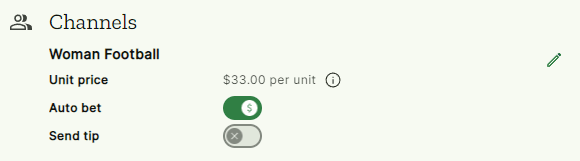
- Unit price: what unit to use for your bets. For example, if you set your unit price to $25.00 and you receive a tip for 0.5µ Tippy will automatically place that bet using $12.50 (0.5µ).
- Auto bet: whether auto betting is enabled for this channel. When enabled, any tips you receive from this channel will be automatically placed.
- Send tips: whether to send tips to this channel (also see Tip sharing in the Safety section). This setting will only be available if you are a channel admin.
Good to know:
This section will not be available if you haven't joined any channels yet.
Editing the settings
Click the 'Edit button' on your profile settings to show the edit settings modal.
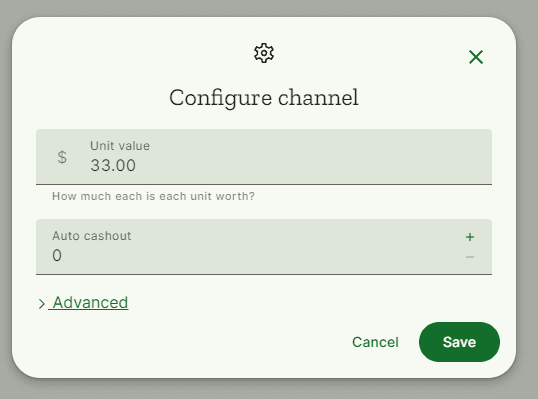
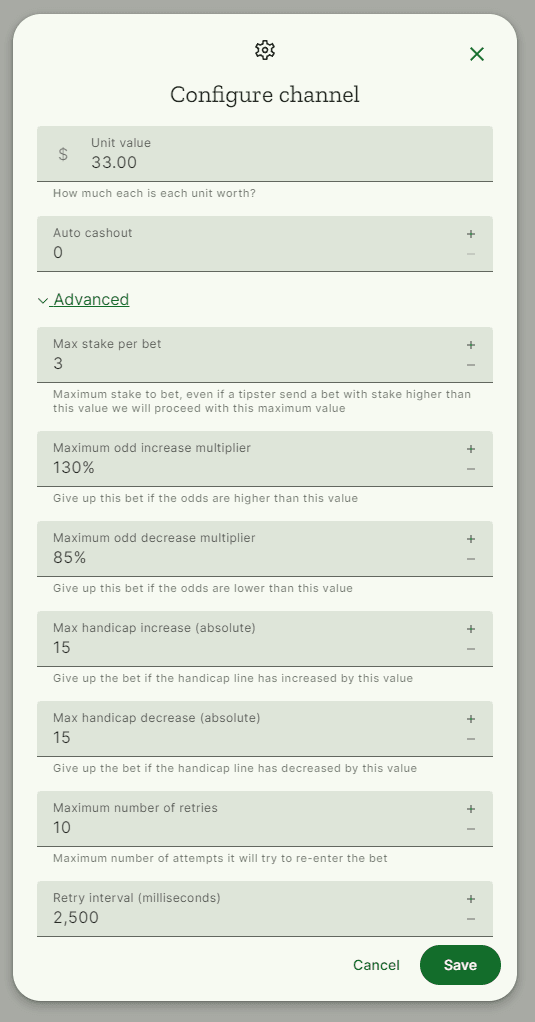
Click the 'Advanced' button to see more options.
Idempotency settings
Idempotency settings control how Tippy handles duplicate or repeated bets on the same match. They prevent accidentally placing the same bet multiple times when, for example, a tipster resends a tip or an update arrives for a bet you already placed.
-
Idempotency checks — When enabled, Tippy will skip any incoming bet if you have already recently placed a bet on the same match (identified by the tip's idempotency key, or automatically by the fixture ID in the bet). Enabled by default.
-
Maximum repeated bets — How many times Tippy is allowed to place bets for the same match before blocking further placements. The default is
1, meaning the second tip for the same match will be skipped. Set this higher if a tipster intentionally sends multiple bets on the same fixture (for example, two different selections in the same game).
Note:
Idempotency checks only apply to same-match deduplication. If a bet update arrives for an exact bet you have already placed (same bet ID), it is always skipped regardless of this setting — this protects against placing the same bet twice due to retries or reconnections.